Social Media for Local Business: Turn Pages Into Posts
Your local business already has six months of social media posts sitting on your website right now. Not in your head, not waiting for inspiration. Written, published, and ready: your service pages and location pages contain everything you need.
The shift is simple. Instead of asking "what do I post today," a plumber, electrician, landscaper, or clinic owner can ask "which page do I atomize today?" Here's how it works, what it looks like in practice, and what happened when Northline Plumbing tested it.
Why Local Businesses Struggle to Keep Up With Social Media
Local business owners are not marketers. They answer phones, run crews, manage books, and then think about Instagram sometime after midnight. Posting consistently means competing with actual paying work for the same two hours in a day, and the content almost always loses.
Generic advice makes this worse. Tell a plumbing company owner to "post three times a week" or "engage your audience," and you've handed them a new chore with no tool to do it. Most marketing guides, including Indeed's small business resources, tell readers to set goals, pick platforms, and track metrics. None of it answers the question that stalls a local owner at 9pm staring at a blank post box: what do I actually type right now?
The real problem is not motivation or strategy. It's a missing content source. Give a business owner a repeatable source for post ideas, and the posting problem mostly solves itself.
How Atomization Turns Service and Location Pages Into Posts
Atomization means breaking one piece of existing web content - a service page or location page - into several short, standalone social posts. Each post covers a single angle from that page and links back to it.
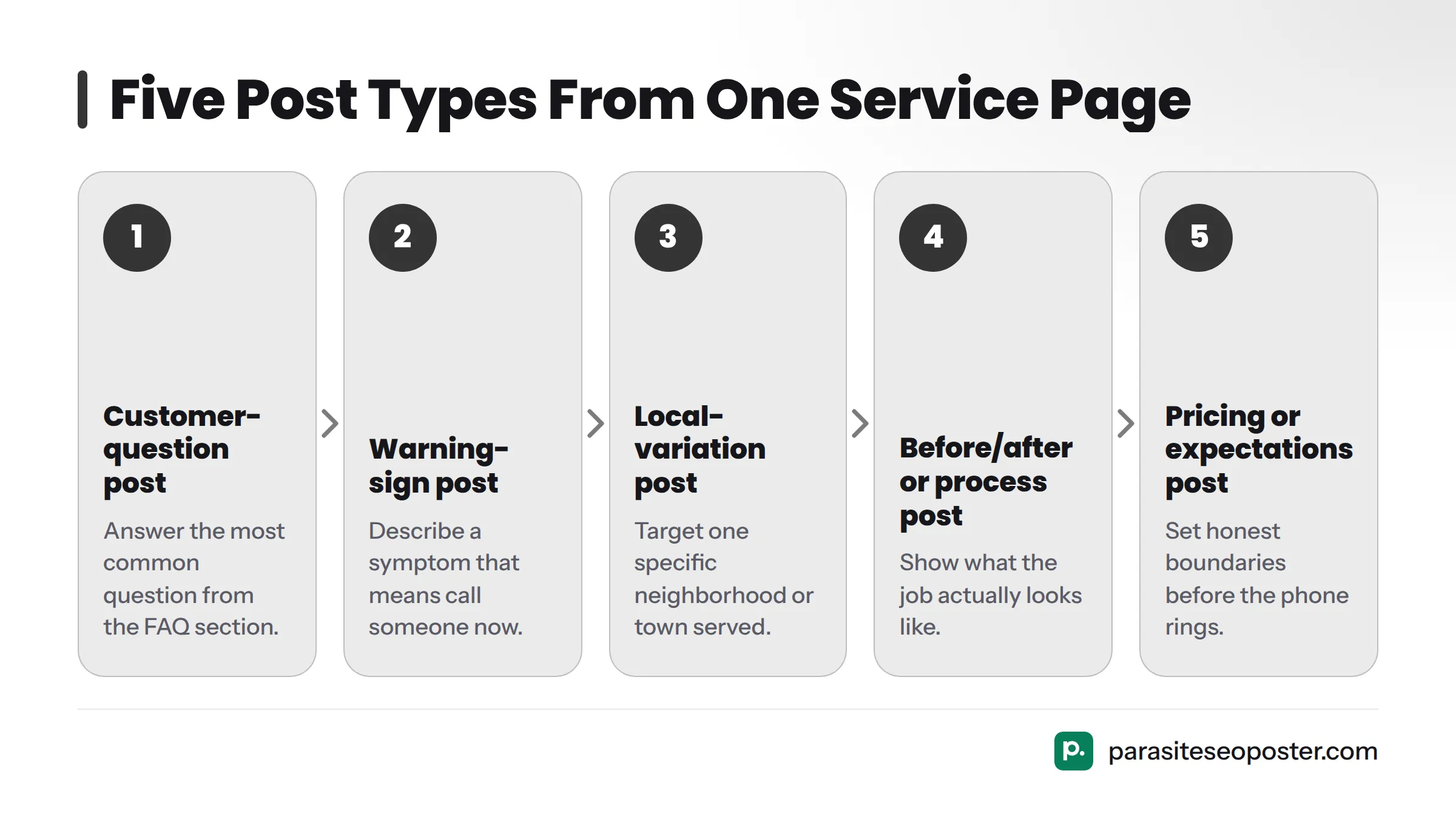
A plumbing company's "drain cleaning" service page probably already answers several separate questions: what causes a clogged drain, what a slow drain usually means, pricing, which towns the company serves, and what customers should do before calling. Each answer is a complete post on its own. You don't need five new ideas; you need to notice the five ideas already on one page.
Each atomized post should link back to the source page. That link does two things: it sends a social follower directly to the page that can book the job, and it signals to search engines that the page has outside activity pointing at it. Posts that link home are worth more than posts that sit on a feed alone.
Here's what one well-built service page can become once atomized:
- A customer-question post answering the most common thing people ask before booking
- A warning-sign post describing a symptom that means "call someone now"
- A local-variation post aimed at one specific neighborhood or town the page serves
- A before/after or process post showing what the job actually looks like
- A pricing or expectations post that sets honest boundaries before the phone rings
That's five posts from one page, each one different enough to stand alone, each one pointing back to the same booking page.
Three Post Patterns From the Northline Plumbing Campaign
These patterns come from a real campaign run for Northline Plumbing, tested rather than theorized. Instead of generic "engage your audience" posts, the campaign used three named, repeatable patterns pulled directly from the business's existing service and location pages.
Customer-Question Posts
A customer-question post takes the single most common question a customer asks before calling - the one buried in the FAQ section - and turns it into a standalone post. For Northline Plumbing, that meant posts like "Why does my water heater make a popping noise?" pulled straight from their water heater repair page. The post answers just enough to be useful and links back to the full page for more.
Warning-Sign Posts
A warning-sign post flags a symptom that should prompt an immediate call. These tend to perform well because they trigger real concern, not idle curiosity. A line like "If your water bill jumped but nothing changed, you may have a hidden slab leak" pulled from a leak-detection page gives a homeowner a reason to act today.
Local-Variation Posts
A local-variation post takes one service and restates it for a specific neighborhood, suburb, or town the business serves. "Slab leak repair in Westlake" and "Slab leak repair in Round Rock" are two different posts, each written for its own area, both linking back to the same leak-detection page or separate location pages where they exist.
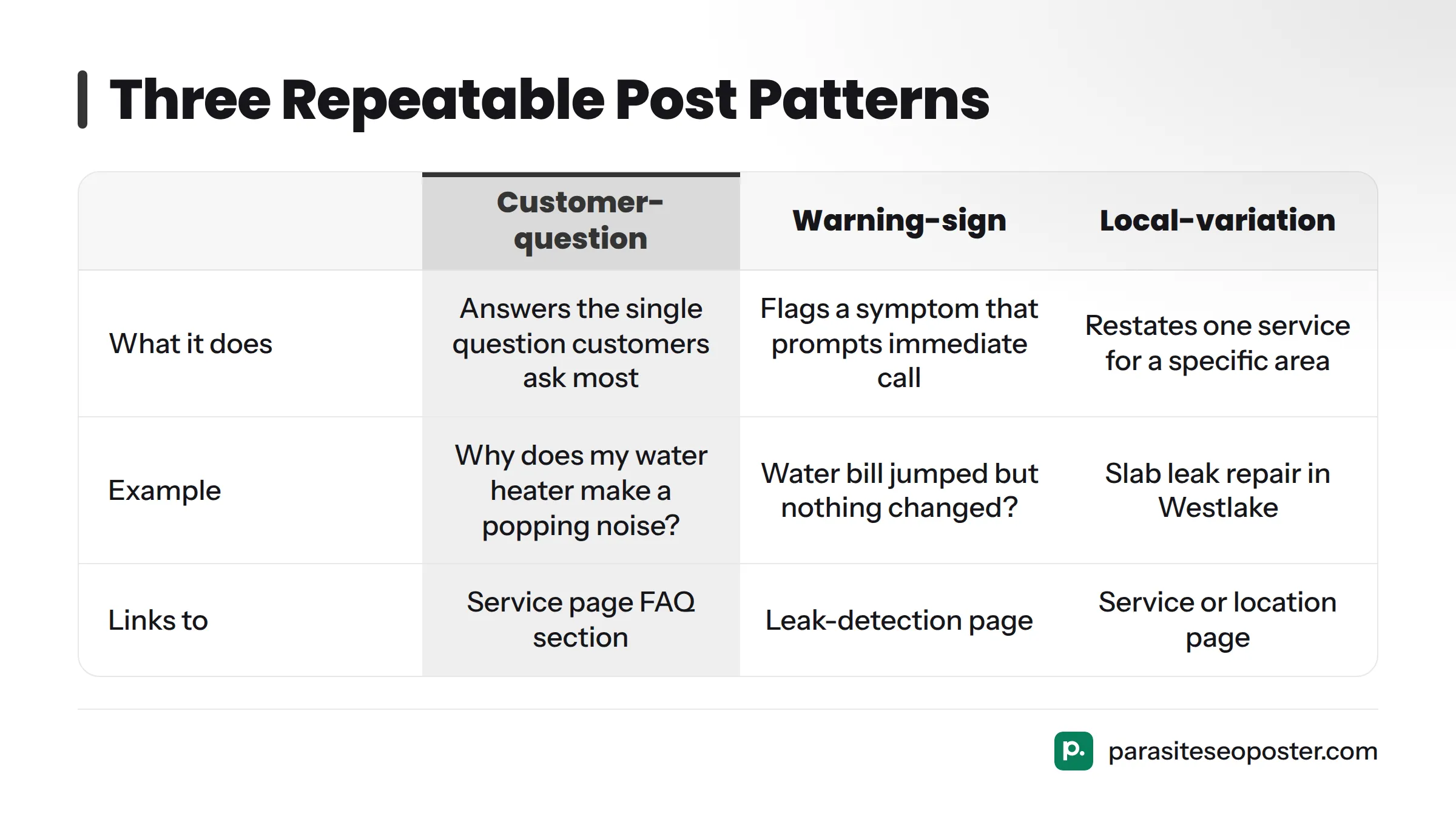
| Post Pattern | What It Does | Example | Links To |
|---|---|---|---|
| Customer-question post | Answers the single question customers ask most before booking | "Why does my water heater make a popping noise?" | The service page's FAQ section |
| Warning-sign post | Flags a symptom that should prompt an immediate call | "Water bill jumped but nothing changed? Could be a slab leak." | The relevant service or repair page |
| Local-variation post | Restates one service for one specific area served | "Slab leak repair in Westlake" vs. "Slab leak repair in Round Rock" | The service page or matching location page |
Northline Plumbing's team tracked post performance and traffic back to the source pages as part of the campaign. That tracking is the difference between a marketing claim and a marketing proof. The full breakdown, including which pattern drove the most traffic and how posting cadence shifted, lives in the Northline Plumbing case study.
Local Variation Posts: One Service, Many Neighborhoods
If your business serves more than one town, suburb, or service area, you have a second content source: geography itself. One roofing service page can become five, ten, or twenty local-variation posts, one for each area you actually serve, without repeating the same sentence twice.
The trick is restating, not repeating. "Roof repair in Maple Grove" should read differently than "Roof repair in Eastvale," even if the underlying service is identical. Mention something specific to each area where it's honest to do so - a common roof style, a local weather pattern, or a nearby landmark - so the post reads like it was written for that neighborhood, not copy-pasted across twenty of them.
Every local-variation post should link back to one of two places:
- The main service page, if you don't maintain separate location pages
- The matching location page, if your site already has one for that area
Either way, you reinforce the same signal search engines and customers both respond to: this business genuinely serves this area, consistently, not just on one buried page. That consistency matters alongside basic trust signals like NAP (Name, Address, Phone) consistency across your listings, which Google's Business Profile guidance treats as a factor in how a profile shows up for nearby searches.
Where These Posts Fit Alongside Your Google Business Profile
Social posts and your Google Business Profile are not competing channels; they're two display windows for the same content. Google has been expanding how much social-style content shows directly inside Maps and Search results tied to a business listing. Posts built from your service pages can end up doing double duty: feeding your social accounts and reinforcing the same local keywords Google already associates with your profile.
This video shows how that connection appears directly inside Google Maps listings at no extra cost:
This page doesn't cover Google Business Profile setup in detail - that lives on our Google Business Profile posting tool page. What matters here is the relationship: atomized posts built from your service and location pages give you content to run in both places at once, instead of writing two separate sets of material.
Getting Started With Your Own Site
You don't need a content calendar, a hired writer, or a strategy document. You need three steps and about fifteen minutes.
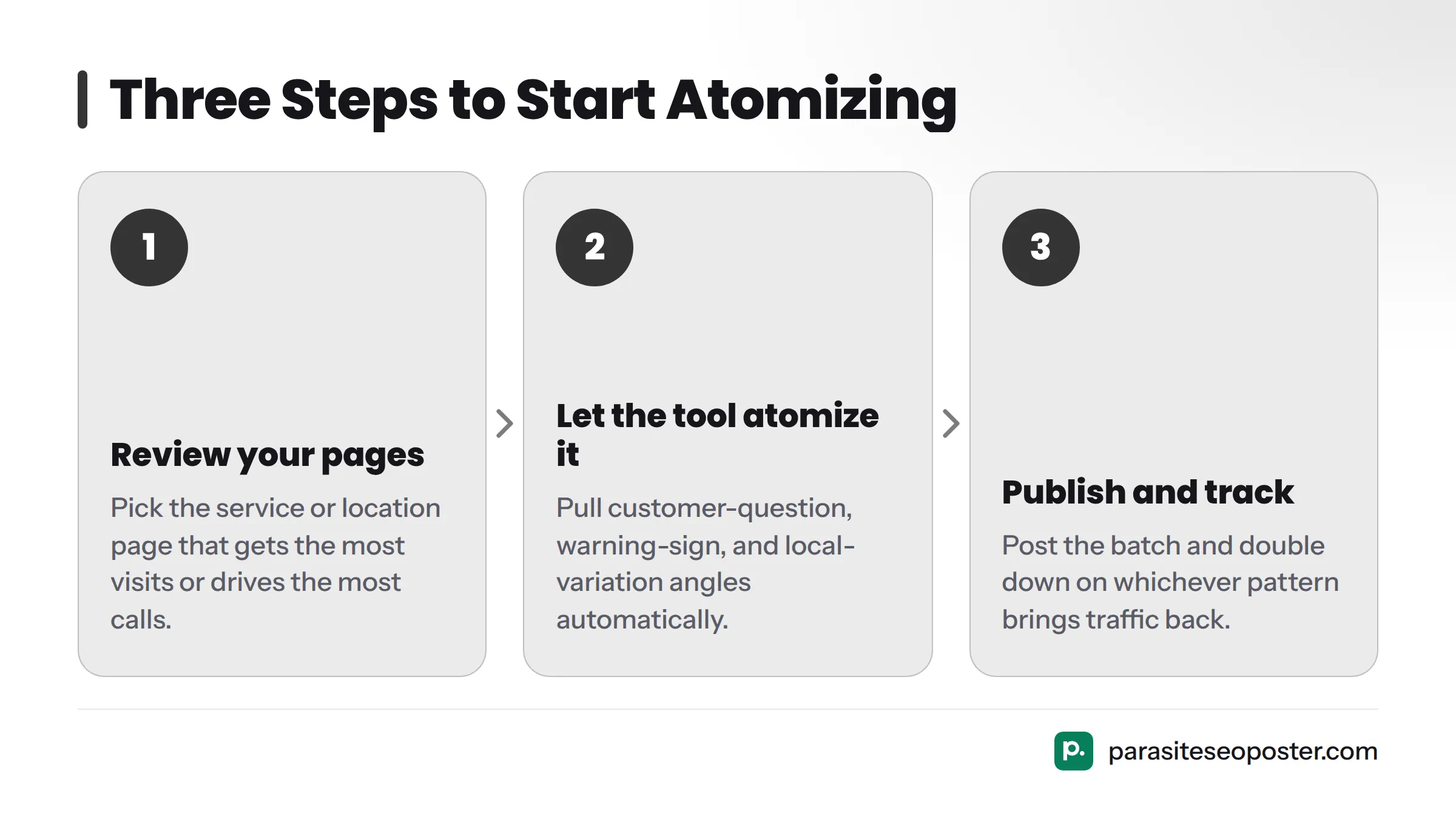
- Review your pages. Pick the service page or location page that already gets the most visits or drives the most calls. That page has the richest material to atomize first.
- Let the tool atomize it. Run that page through an atomization and social media scheduler so the customer-question, warning-sign, and local-variation angles get pulled out and queued automatically.
- Publish and track. Post the first batch, then watch which pattern brings traffic back to the source page. Double down on whichever pattern performs best for your business.
One honest caveat: a page that's too thin or too uncompetitive to rank for its target keyword won't produce strong posts either, because there's not enough substance on the page to pull from. A basic keyword competitiveness check before atomizing is a feature, not a limitation. It means the system refuses to manufacture empty posts from an empty page, which beats publishing content nobody searches for.
Ready to try it on your own site? See plans and the free tier and atomize your top service page today, no writer and no blank calendar required.
For trade-specific angles, our guide to social media for contractors covers that context in depth. Our broader explainer on how to turn your website into social media posts covers the atomization concept outside the local business context.
FAQ
How often should a local business post on social media?
There's no universal number, but a realistic starting cadence for a busy local business is two to four posts per week, drawn from one service page atomized into several angles. Consistency across weeks matters more than volume in any single week.
Can I make posts for different towns I serve?
Yes. Local-variation posts are built for exactly this. One service page can produce a distinct post for every town, suburb, or neighborhood you genuinely serve, each one linking back to the matching service or location page.
Do I need a content writer?
No. The entire point of atomization is pulling posts from content that already exists on your site, so you're editing and publishing rather than writing from a blank page.
Will it publish for a page that is too weak to rank?
No, and that's intentional. A keyword competitiveness check runs before atomization, so pages without enough substance or search opportunity won't generate posts. This protects your time and keeps the content honest rather than padding your feed with posts that can't perform.
How This Differs From Generic Social Media Advice
General social media marketing advice tells you to pick a platform, set a goal, and post consistently. None of that tells you what to type into the post box. Atomization answers that directly: pull it from the page you already have, using one of three repeatable patterns, then link back.
For a broader look at building a content habit and editing short video alongside these posts, this overview walks through planning a content strategy from scratch:
Does This Replace Your Existing Strategy?
Atomization is not a replacement for a social media presence; it's the engine behind one. If you already run paid ads, manage a community Facebook group, or post personal behind-the-scenes content, keep doing that. Atomized posts slot in alongside that work as the steady, repeatable backbone, so posts that require more effort - like video or live events - aren't competing with posts that should take five minutes.
Local businesses of nearly every type can use this: home service contractors, clinics, salons, law firms, auto shops, and any service business with more than a handful of pages describing what you do and where you do it. The requirement isn't a specific trade; it's simply having service or location pages worth atomizing.
Once you have a batch of posts running and linking back to your site, you're not just filling a calendar. You're building a steady trail of links and local keyword mentions that support the same pages your customers find when they search for your service nearby. That's why this approach belongs in a local search visibility conversation alongside social media strategy.
Sources
Google Business Profile Guidance on NAP Consistency
Related: parasite SEO for small business, see plans and the free tier